Is that text right for your class? Check its reading age free below. Try it now
For NSW teachers · reading levels

Is this text right for your class? Check its reading age in seconds.

Paste any passage and get its reading age and reading level, with the hardest sentences flagged — free, no sign-up, and nothing you paste leaves your computer.

Free · no sign-up · runs entirely in your browser.

Free · no sign-up

Check a passage's reading age now.

Paste a worksheet, an extract or an exam question, press the button, and get its reading age, grade level and the sentences worth shortening.

🔒 Runs in your browser — nothing you paste is sent anywhere.

That's the reading age of one passage. The full Open Period tool takes one source and levels it into Support, Standard and Extension — the same text at three reading levels — privately on your computer.

Get the full tool free →
Built by a teacher (ACU, in training)
Data never leaves your computer
You approve every word
Built for your school's AI policy

"I built Open Period because I watched the maths up close: the pile that never shrinks, the evenings that do, and the feedback cut first every time. I didn't want a tool that marked for teachers. I wanted one that gave the boring half back and left the judgement where it belongs — with you." — Scott, the maker · English teacher in training, ACU

Be first in line

Want one text at three reading levels?

The free checker tells you how hard a text is. The full tool takes one source and levels it into Support, Standard and Extension — the same content at three reading levels — privately, on your computer. Leave your email to be first in when it opens.

Free for two weeks, no card
Keep everything you make
Free founding access for early teachers

We'll email you the moment we open the doors. No card, no spam.

You're on the founding list 🎉

The founding cohort is small. Bring your staffroom in with you — share with 3 teachers who'd want this too.

Built for your school's AI policy

A reading checker that can't break your data policy.

  • The passage stays in your browser. The free checker runs entirely on your computer; nothing you paste is sent anywhere or stored.
  • Made for the Australian Framework for Generative AI in Schools: a tool gives you an estimate, a human decides. You're the teacher, start to finish.
  • You make the call on whether a text fits your class — the formula is a guide, not a verdict.
  • NSW DoE tells staff not to put student work into free cloud AI. This checker doesn't send anything anywhere — the safe answer, not a quiet workaround.
"Paste a passage; get its reading age, grade level and the hardest sentences to revise — and nothing you paste ever leaves your computer." The privacy is in the architecture, not just the promise.
The full tool, on real work

One task. Three reading levels.

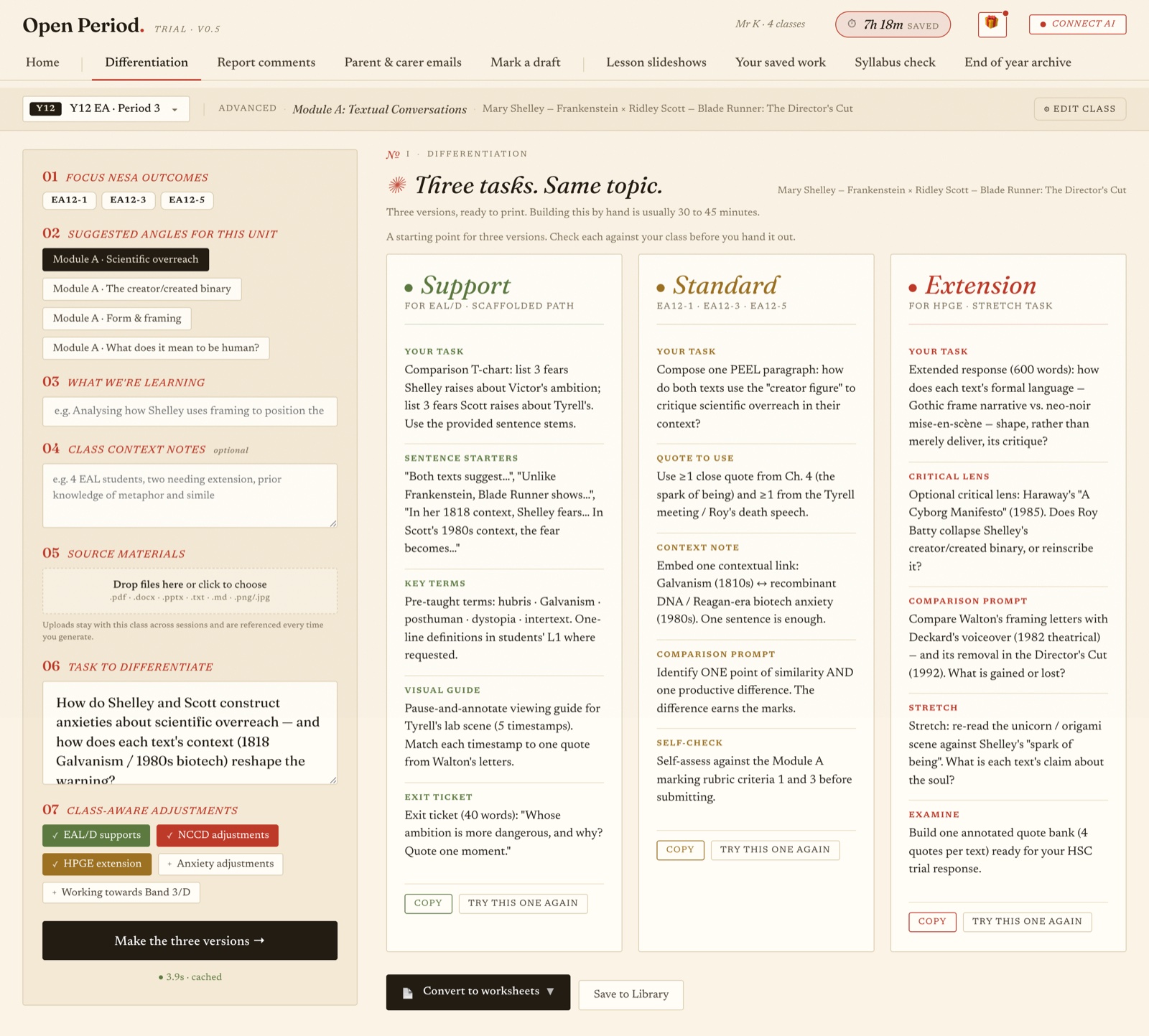
This is the full tool taking one source and levelling it into Support, Standard and Extension — the same content, three reading levels, each ready to hand out.

One classroom task levelled into Support, Standard and Extension — the same content rewritten at three reading levels.

One source becomes three levelled versions — the same task at Support, Standard and Extension reading levels, each ready to edit and hand out.

Fair questions

Reading levels, answered straight.

How does it estimate reading age?
It uses the Flesch–Kincaid grade level — a long-standing readability formula based on sentence length and word length (syllables). The reading age is roughly that grade plus five years. It's an estimate to help you judge fit, not an official measure: the formula counts how long sentences and words are, but it can't see vocabulary load, concept difficulty, cultural knowledge or how interesting a text is. Use your judgement.
Is my text private?
Yes. The checker runs entirely in your browser using plain JavaScript. Nothing you paste is sent to a server, stored, or seen by anyone — it never leaves your computer. You can paste it and close the tab and it's gone.
What reading level should my class be?
As a rough guide, a mainstream Stage 4 class (Years 7–8) sits around a Year 7–8 reading level, Stage 5 (Years 9–10) around Year 9–10, and senior English higher again — but your class is your class. Support students may need a levelled version or scaffolds, and strong readers can be stretched. Treat the number as a starting point for your professional judgement, never a rule.
Can it make a text easier or harder?
The free checker only measures — it tells you how hard a text is and flags the sentences worth shortening. The full Open Period tool goes further: it takes one source and levels it into Support, Standard and Extension, so you have the same content at three reading levels, ready to edit and hand out. You approve every version.
What does it cost?
The checker is free with no sign-up. Right now you're joining the founding list for the full tool, which is also free — leave your email and you'll be first in when we open, with free founding access for early teachers. No card, nothing recurring to join.
More free tools for teachers